

Custom Docmosis Documents
Getting Started
Once the add-on is enabled, administrators can upload templates from Organisation Setup > Docmosis Templates. Each upload must be a .docx file up to 10 MB, and each template name must be unique within its template type.
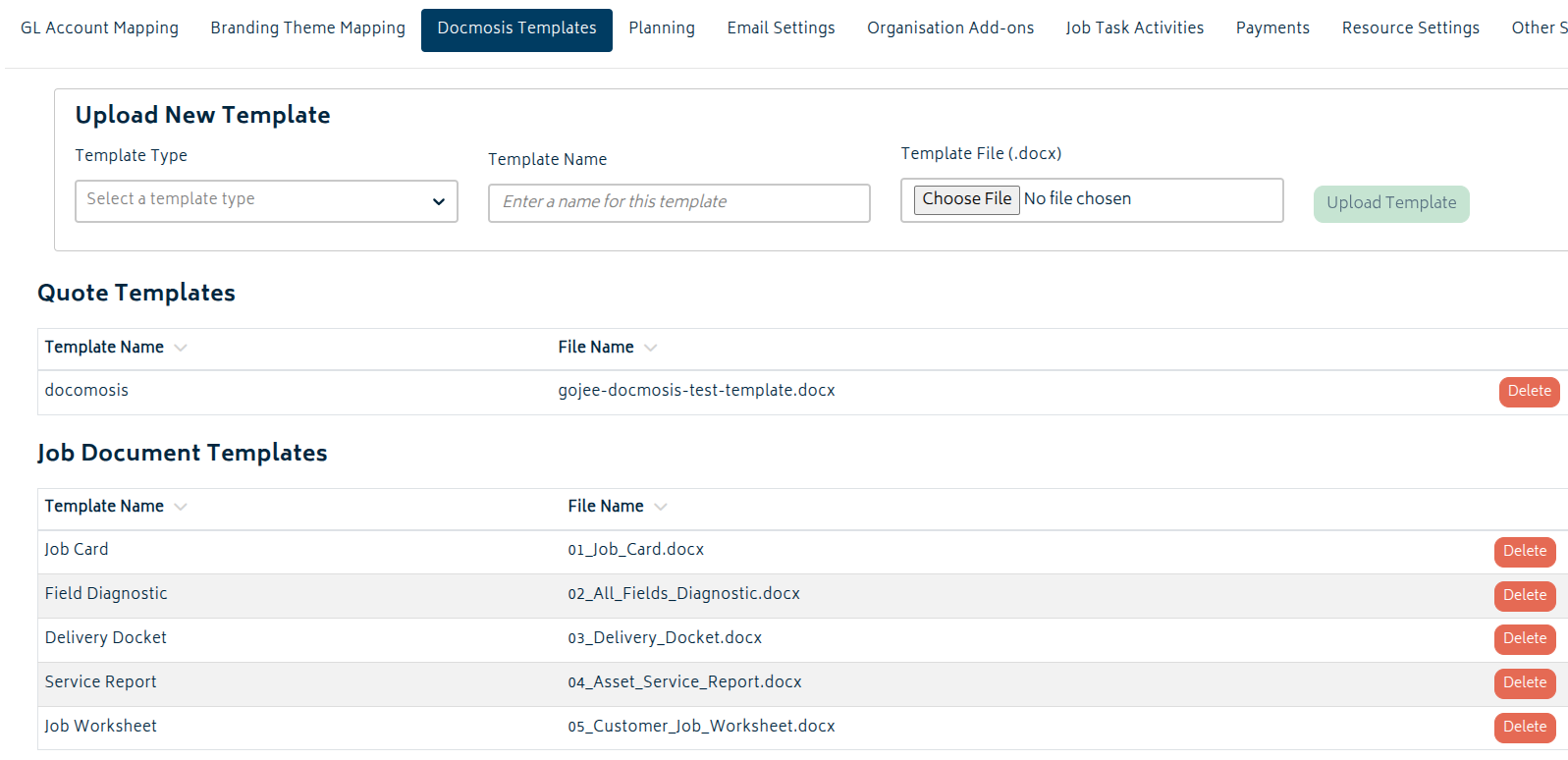
There are two template types:
- Quote Templates appear as branding themes on supported quote workflows.
- Job Document Templates are used from Job Actions > Documents to generate job-specific documents.
Quote templates can also have per-template expiry date defaults. Administrators can use the Expiry and Expiry Period columns to control the expiry date applied when a quote is generated from that Docmosis template.
Here is a downloadable template file you can edit or use as a starting point for your own proposal or job document: Docmosis Gojee Quote Template
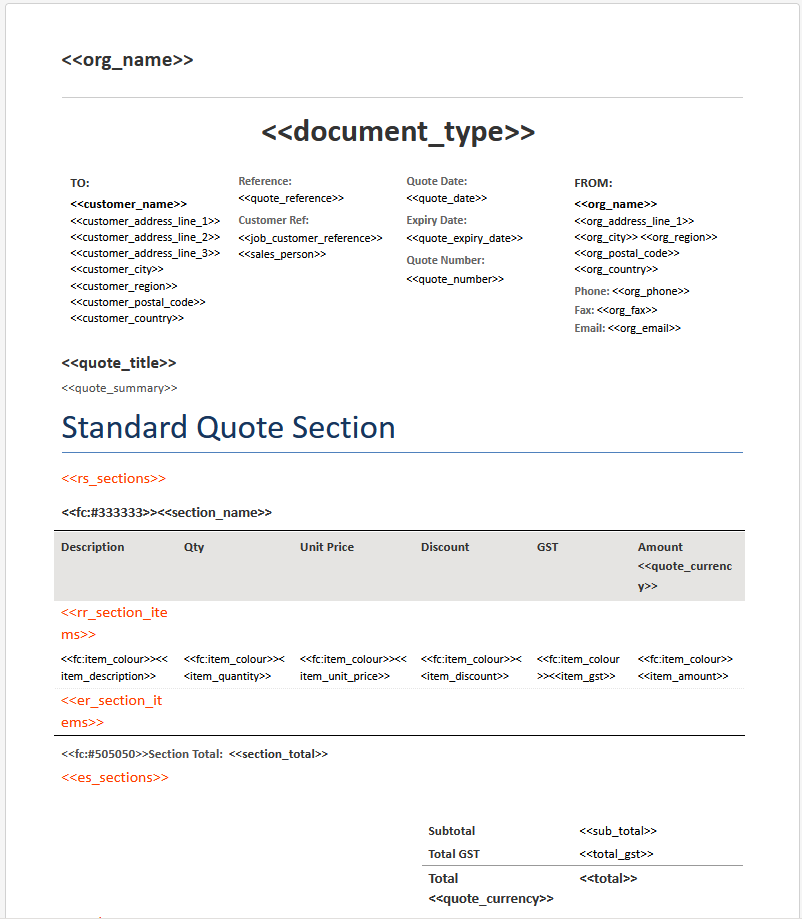
When uploading the template, if there are issues with the template format, the upload will be rejected. A diagnosis file will be downloaded for you to check over any issues.
Formatting the Template
Templates should be saved as .docx files. Editing in Microsoft Word desktop is recommended. The upload process can be sensitive to how the document is saved, so while files produced by OpenOffice, LibreOffice, or similar editors should also work, results may vary.
Text placeholders use the standard <<field_name>> format, replacing the plaintext with the necessary values. If a field has no value, Gojee supplies a blank value rather than printing the placeholder text into the finished document.
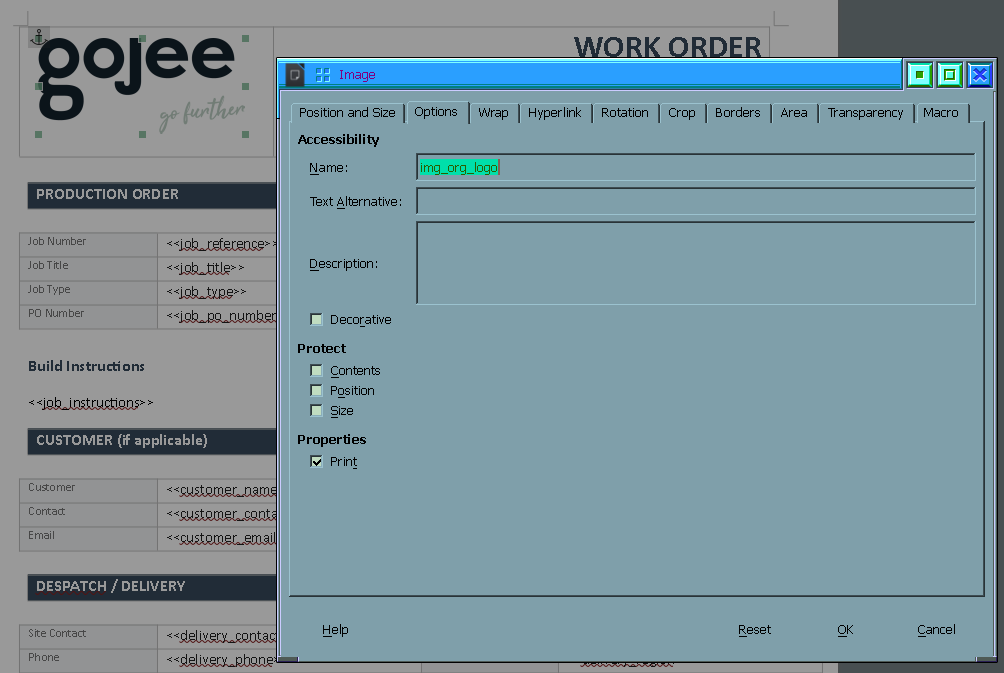
Image placeholders are created by modifying the name of an image in the document - how this is done varies by editor, but is typically done via a Properties dialog. For example, setting the name to img_org_logo will replace the image in the template with your organisation's uploaded letterhead.
There are also control headers for section and item repeaters for use with the main body of the quote and also variations.
-
<<rs_sections>> and <<es_sections>> are for setting up repeating sections (eg. the main body of the quote).
-
<<rr_section_items>> and <<er_section_items>> are to be placed inside of a table. These control the line items of the section.
- The borders of the row rr_section_items is in will be applied to the top row of the table.
- The formatting of the row er_section_items is in will be applied to every second row, allowing you to set up alternating row colours. The borders will be applied to the bottom row.
-
<<cs_has_variation_sections>> and <<es_has_variation_sections>> are for the header for variations. If there are no variations, the area between these headers will not appear.
-
<<rs_variation_sections>>, <<es_variation_sections>>, <<rr_variation_items>>, and <<er_variation_items>> work the same as normal sections do. These will repeat for every variation and section that are included in the rich quote.
Building Job Documents
Job Document Templates use the same Docmosis field syntax, but they are generated from the Documents action on a job rather than from the quote screen. This tab will only be visible if Custom Docmosis Documents is enabled.
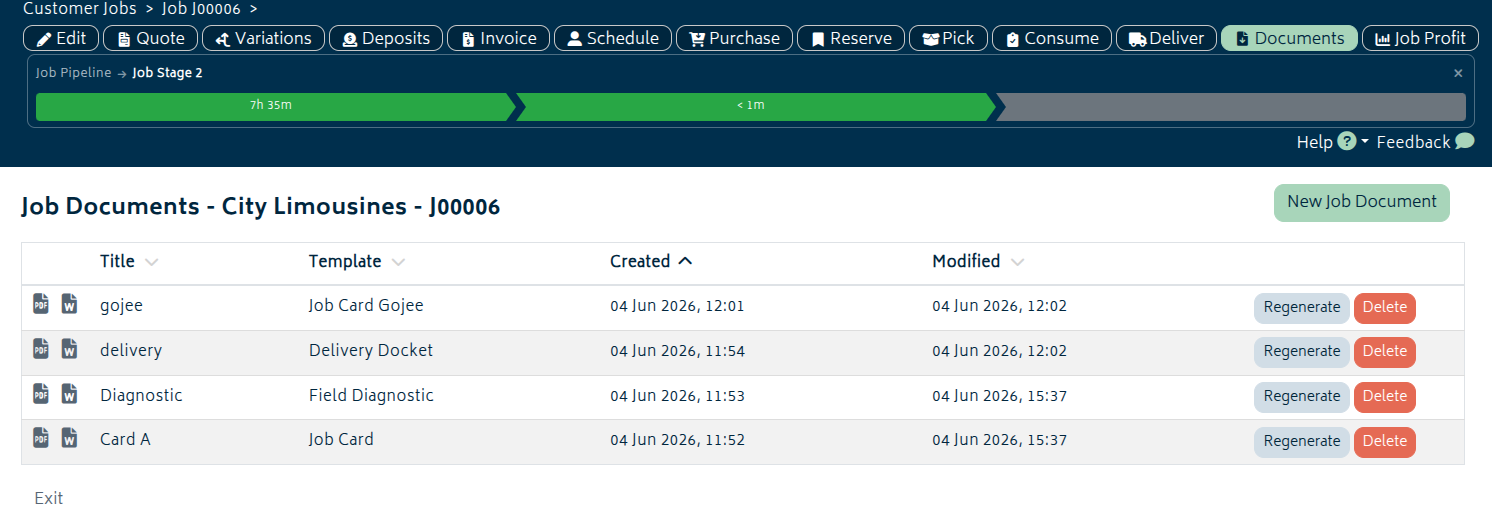
From Job Actions > Documents, users can open the document list for a job and:
- Create a new job document by choosing a Job Document Template and entering a document title.
- Download the generated PDF and DOCX files for an existing document.
- Regenerate a document so it uses the latest job, customer, site, sales person, and linked asset data.
- Delete documents that are no longer needed from the list.
If a template used by an existing document has been deleted, the existing files can still be downloaded, but that document can no longer be regenerated from the same row.
For service jobs, linked asset details are also supplied to Docmosis, allowing the same template system to produce job cards, service reports, and similar customer-facing documents.
Building Rich Quotes
When you select a Docmosis quote template as the branding theme on a quote, the quote editor switches into the rich quote layout mode.
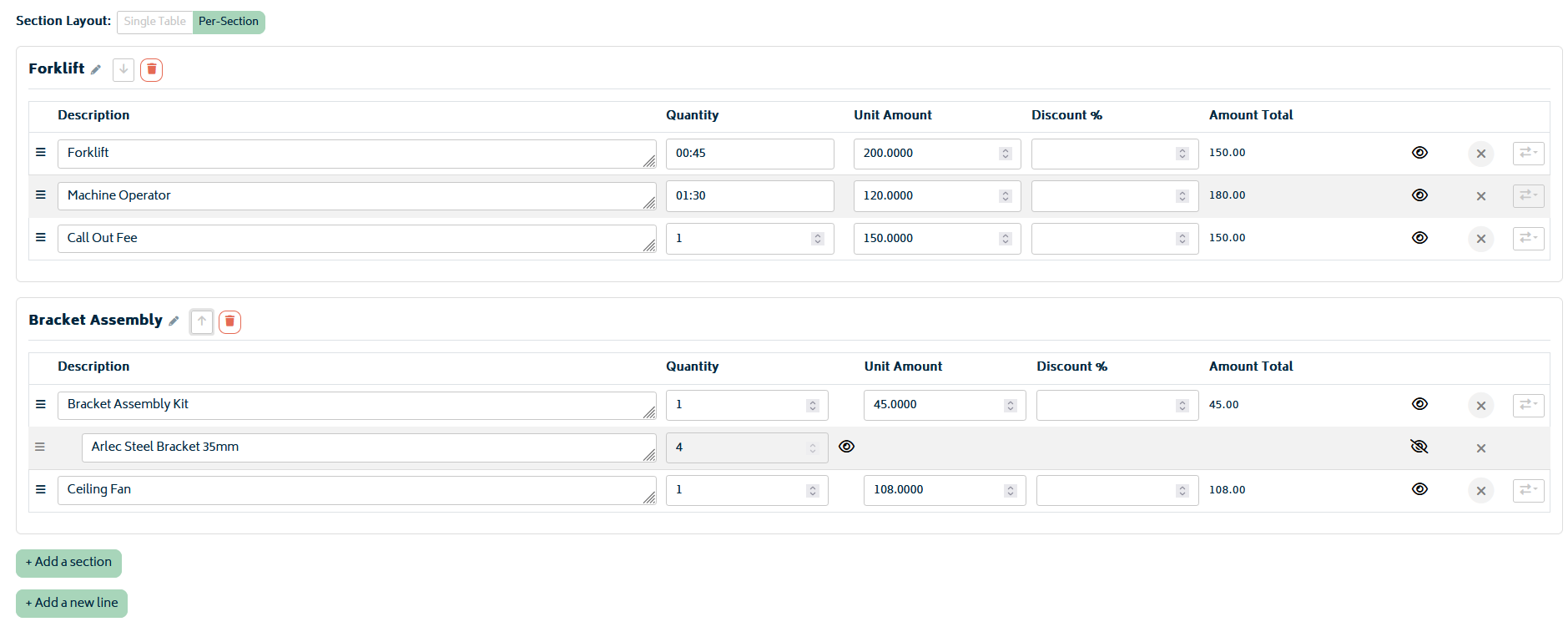
You can work in either of these layouts:
- Single Table: All quote items stay in one table.
- Per-Section: Quote items are grouped into named sections, and you can organise the proposal section by section.
In Per-Section mode, you can rename sections, move sections up or down, add new sections, remove sections, and move top-level quote items between sections. This lets you structure the proposal in the order you want the customer to read it, without changing the rest of the quote workflow.
When the quote is generated, Docmosis replaces the placeholders in your template with the quote, job, customer, organisation, section, and totals data from Gojee.
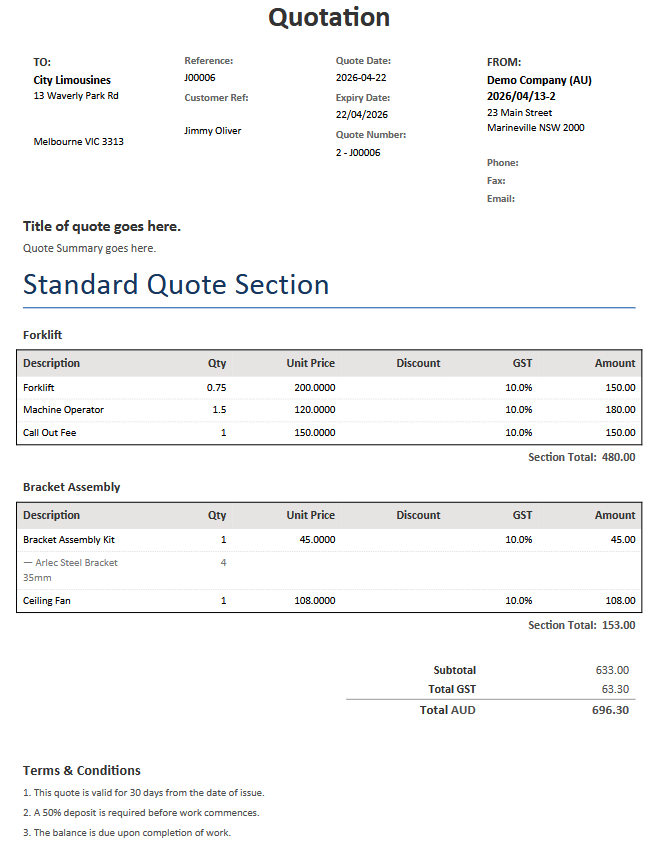
If the Variations add-on is enabled, you can also choose which pending variations or scope variations to include in the proposal.
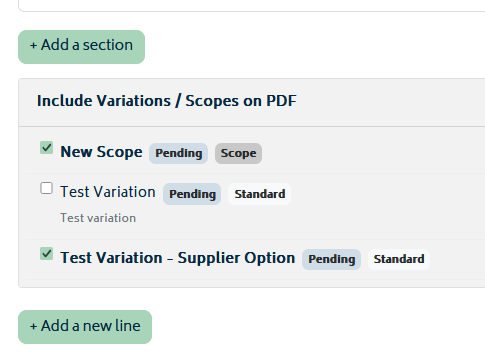
For variation content, Gojee supports a separate variation data set in addition to the main quote sections. You can:
- Select exactly which pending variations or scopes to include.
- Use a shorter child-item description style by hiding the full parent path.
- Hide removed variation rows while still keeping their values in the section total.
Rejected variations will not appear here or be able to be selected.
Available Fields
The fields below reflect the current Docmosis data supplied by Gojee.
Quote Templates can use the single-value fields plus the repeating quote collections such as sections and variation_sections.
Job Document Templates can use the single-value fields, including <<job_document_title>> and the service asset fields, but they will not include any values from the quote, section, or variation collections.
If your organisation requires additional fields, please contact us.
Organisation Details
| Field | Description | Example |
|---|---|---|
| <<org_name>> | Organisation name | Smith Construction Pty Ltd |
| <<org_phone>> | Organisation phone number set in Xero. | 03 9555 1234 |
| <<org_fax>> | Organisation fax number set in Xero. | 03 9555 1235 |
| <<org_email>> | Contact Email set in Gojee. | accounts@fake.email.com.au |
| <<org_logo>> | Organisation logo image - see above for use. Do not use <<org_logo>> directly in the document. | image:base64:iVBORw0KGgoAAAANSUhEUgAABAAAAAQACAYAAAB/HSuDAAABhW... |
| <<org_address_line_1>> | Organisation street address line 1 | 123 Builder St |
| <<org_city>> | Organisation city | Melbourne |
| <<org_region>> | Organisation state or region | VIC |
| <<org_postal_code>> | Organisation post code | 3000 |
| <<org_country>> | Organisation country | Australia |
Customer Details
| Field | Description | Example |
|---|---|---|
| <<customer_name>> | Customer or business name | North Group |
| <<customer_contact_name>> | Primary customer contact full name | Jim Bob |
| <<customer_email>> | Primary customer contact email | jim.bob@fake.email.com.au |
| <<customer_all_emails>> | All customer contact emails as a comma-separated list | jordan.lee@fake.email.com.au, accounts@fake.email.com.au |
| <<customer_address_line_1>> | Customer address line 1 | 15 Market St |
| <<customer_address_line_2>> | Customer address line 2 | Townland |
| <<customer_address_line_3>> | Customer address line 3 | Accounts Payable |
| <<customer_city>> | Customer city | Melbourne |
| <<customer_region>> | Customer state or region | VIC |
| <<customer_postal_code>> | Customer post code | 3000 |
| <<customer_country>> | Customer country | Australia |
| <<customer_abn>> | Customer ABN | 12 345 678 901 |
| <<customer_acn>> | Customer ACN | 123 456 789 |
| <<customer_tax_number>> | Customer tax number | 12 345 678 901 |
| <<customer_company_number>> | Customer company number | 123 456 789 |
Note: <<customer_abn>> and <<customer_tax_number>> will provide the same values, whichever you use. <<customer_acn>> and <<customer_company_number>> are the same.
Additional contact slots are also available for contacts 1 through 5. Each slot supplies the following fields:
- <<customer_contact_1_name>> to <<customer_contact_5_name>>
- <<customer_contact_1_first_name>> to <<customer_contact_5_first_name>>
- <<customer_contact_1_last_name>> to <<customer_contact_5_last_name>>
- <<customer_contact_1_email>> to <<customer_contact_5_email>>
Delivery / Site Details
| Field | Description | Example |
|---|---|---|
| <<delivery_contact_name>> | Delivery or site contact name | Casey Brown |
| <<delivery_phone>> | Delivery or site contact phone | 0412 345 678 |
| <<delivery_address_line_1>> | Delivery address line 1 | 40 River Rd |
| <<delivery_address_line_2>> | Delivery address line 2 | Warehouse 3 |
| <<delivery_address_line_3>> | Delivery address line 3 | Gate B |
| <<delivery_city>> | Delivery city | Melbourne |
| <<delivery_region>> | Delivery state or region | VIC |
| <<delivery_postal_code>> | Delivery post code | 3000 |
| <<delivery_country>> | Delivery country | Australia |
Job Details
| Field | Description | Example |
|---|---|---|
| <<job_reference>> | Job reference number | J000245 |
| <<job_title>> | Job title | Main Office Fitout |
| <<job_contact_name>> | Full job or site contact name | Casey Brown |
| <<job_contact_first_name>> | First name of the job contact | Casey |
| <<job_contact_last_name>> | Last name of the job contact | Brown |
| <<job_phone>> | Job or site contact phone number | 0412 345 678 |
| <<job_instructions>> | Job instructions or scope notes | Install new reception joinery and meeting room cabinetry. |
| <<job_start_date>> | Job start date | 2026-06-01 |
| <<job_end_date>> | Job end date | 2026-06-21 |
| <<sales_person>> | Sales person name. | Sam Gojee |
| <<job_type>> | Job type or quote type label | Fixed Price |
| <<job_po_number>> | Customer PO or reference number | PO-77841 |
| <<job_location>> | Combined job location or site address. | 40 River Rd, Warehouse 3, Melbourne, VIC, 3000, Australia |
| <<job_address_line_1>> | Job or site address line 1 | 40 River Rd |
| <<job_address_line_2>> | Job or site address line 2 | Warehouse 3 |
| <<job_address_line_3>> | Job or site address line 3 | Gate B |
| <<job_city>> | Job or site city | Melbourne |
| <<job_region>> | Job or site state or region | VIC |
| <<job_postal_code>> | Job or site post code | 3000 |
| <<job_country>> | Job or site country | Australia |
Job Document Fields
These fields are used only for Job Document Templates
| Field | Description | Example |
|---|---|---|
| <<job_document_title>> | Document title entered when the job document is created | Job Card for Sam |
Asset Details
These fields are populated for service jobs when the job has a linked asset. For non-service jobs they are supplied as blank values.
| Field | Description | Example |
|---|---|---|
| <<asset_name>> | Asset name | Excavator 1 |
| <<asset_code>> | Asset code | EX-001 |
| <<asset_description>> | Asset description | 30t excavator |
| <<asset_serial_number>> | Asset serial number | SN-123 |
| <<asset_engine_number>> | Engine number | EN-456 |
| <<asset_year_model>> | Year model | 2021 CAT 330 |
| <<asset_chassis_number>> | Chassis number | CH-789 |
| <<asset_registration_number>> | Registration number | REG-321 |
| <<asset_insurance>> | Insurance reference | Policy ABC |
| <<asset_customer>> | Asset customer name | Client Co |
| <<asset_location>> | Combined asset location address | 10 Site Rd, Unit 3, Brisbane, QLD, 4000, AU |
| <<asset_address_line_1>> | Asset location address line 1 | 10 Site Rd |
| <<asset_address_line_2>> | Asset location address line 2 | Unit 3 |
| <<asset_address_line_3>> | Asset location address line 3 | |
| <<asset_address_line_4>> | Asset location address line 4 | |
| <<asset_city>> | Asset city | Brisbane |
| <<asset_region>> | Asset state or region | QLD |
| <<asset_postal_code>> | Asset post code | 4000 |
| <<asset_country>> | Asset country | AU |
Quote and Totals
These fields and collections are available to Quote Templates. Job Document Templates do not receive quote totals, sections, or variation collections.
| Field | Description | Example |
|---|---|---|
| <<document_type>> | Quotation or Estimate | Quotation |
| <<quote_number>> | Quote number | 24 - Main Quote |
| <<quote_reference>> | Quote reference | J000245 / 24 |
| <<quote_date>> | Quote issue date | 2026-05-19 |
| <<quote_expiry_date>> | Quote expiry date | 2026-06-18 |
| <<quote_title>> | Quote title | Reception and Meeting Room Joinery |
| <<quote_summary>> | Quote summary | Supply and install custom joinery for reception and two meeting rooms. |
| <<quote_terms>> | Quote terms and conditions | Deposit required before manufacture. Lead time 4 weeks. |
| <<quote_currency>> | Quote currency code | AUD |
| <<sales_person>> | Sales person name | Sam Gojee |
| <<hide_discount>> | True when the discount column is hidden from the main quote table | true |
| <<hide_gst>> | True when the GST column is hidden from the main quote table | false |
| <<sub_total>> | Quote subtotal amount | 12,500.00 |
| <<total_gst>> | Total GST amount | 1,250.00 |
| <<total>> | Total quote amount | 13,750.00 |
| <<has_variation_sections>> | True when the proposal includes variation sections | true |
Main Quote Sections
The main quote content is provided through the repeating sections collection. Each section contains its own rows and total.
| Collection or Field | Description | Example |
|---|---|---|
| <<sections>> | Repeating collection of quote sections | Joinery, Installation, Electrical |
| <<section_name>> | Section heading shown in the proposal | Joinery |
| <<section_total>> | Total amount for the section | 9,800.00 |
| <<section_items>> | Repeating collection of line items within the section | Cabinetry, Benchtops, Hardware |
| <<item_description>> | Display description for the line item | Main Reception Counter |
| <<item_raw_description>> | Original line item description without Docmosis formatting | Reception Counter |
| <<item_display_description>> | Formatted line item description as shown in the proposal | — Reception Counter |
| <<item_is_template>> | True when the row is a template parent item | false |
| <<item_level>> | Template nesting level for the item | 1 |
| <<item_path>> | Template path for the item | Reception / Cabinetry |
| <<item_quantity>> | Quantity shown for the line item | 2 |
| <<item_unit_price>> | Unit price shown for the line item | 1250.0000 |
| <<item_discount>> | Discount value for the line item, or blank when discounts are hidden | 10 |
| <<item_gst>> | GST value for the line item, or blank when GST is hidden | 10 |
| <<item_amount>> | Line total amount | 2,500.00 |
| <<item_colour>> | Colour value used for child or nested template rows | #777777 |
Variation Sections
Included variations and scope variations are supplied separately through the repeating variation_sections collection. This lets you style them differently from the main quote sections if required.
| Collection or Field | Description | Example |
|---|---|---|
| <<variation_sections>> | Repeating collection of included variation or scope sections | Reception Scope Change, Additional Storage |
| <<variation_title>> | Variation title | Reception Scope Change |
| <<variation_description>> | Variation description | Additional stone top and revised drawer layout. |
| <<variation_status>> | Variation status label | Pending |
| <<variation_total>> | Total amount for the variation section | 1,850.00 |
| <<variation_items>> | Repeating collection of rows within the variation section | Stone Benchtop Upgrade, Extra Drawers |
| <<item_description>> | Variation row description | Stone Benchtop Upgrade |
| <<item_quantity>> | Variation row quantity | 1 |
| <<item_unit_price>> | Variation row unit price | 1850.0000 |
| <<item_amount>> | Variation row amount | 1,850.00 |
| <<item_colour>> | Colour value used for child rows in the variation output | #777777 |
Docmosis Resources
If you need further help setting up your .docx file or refining your Docmosis template, the official resources below are a good reference:
Next: Organisation Add-ons.
Or: Back to Knowledge Base.